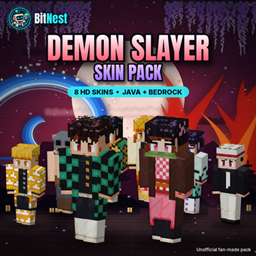
Put on Tanjiro’s checkered haori and set off to explore the world of Minecraft as a demon hunter. This pack adds eight skins inspired by Demon Slayer: from Nezuko with her bamboo muzzle to Muzan in a white hat. 🗡️

Eight looks for a new adventure 🎮
Choose Tanjiro with his hanafuda earrings, scar, and green-and-black haori, or Nezuko with her pink ribbon, patterned kimono, and dark cloak. Zenitsu wears a yellow-orange haori with white triangles, while Inosuke has a gray boar mask, a fur belt, and loose dark pants.
The pack also includes Giyu Tomioka with a haori split into two parts, Rengoku with fiery patterns on his clothes, and Shinobu with a butterfly ornament. Muzan rounds out the crew with curly black hair, a white hat with a red ribbon, and a black suit.
The skins are detailed on all sides, including the top and bottom. The 128×128 version features expressive eyes, hair strands, clothing seams, and a raised outer layer for hairstyles, collars, jackets, and accessories. Each character has a fitting Classic or Slim model; the 3D previews are made from the same files included in the pack.
Which file to choose
For Bedrock, you can get the HD file Demon_Slayer_Characters_Skin_Pack_Bedrock_HD_v1.1.0.mcpack in 128×128 resolution or the standard 64×64 version — Demon_Slayer_Characters_Skin_Pack_64x_Java-Bedrock_v1.1.0.mcpack. The 64×64 version also works for Java Edition.
Installing and choosing a skin
- Download one of the pack’s files.
- Open the file on Windows, Android, or iOS: Minecraft will launch and import the pack.
- In the game, open Dressing Room › Classic Skins. In older versions, the path may look like this: Profile › Edit Character › Classic Skins.
- Select Demon Slayer Characters Skin Pack and equip a character skin.
Using it in Java Edition
- Download the 64×64 file
Demon_Slayer_Characters_Skin_Pack_64x_Java-Bedrock_v1.1.0.mcpack. - Rename the extension
.mcpackto.zipand extract the archive. - Find the PNG file for the skin you want: the filename will specify the model, for example
character_CLASSIC.pngorcharacter_SLIM.png. - In Minecraft Launcher, open Java Edition › Skins › New skin › Browse, select the PNG and the Classic or Slim model according to the filename, then click Save & Use.
The pack works in Minecraft Bedrock Edition 1.18.30 and later, including on Chromebook. It’s a skin pack: no add-on or experimental toggles are needed, and you can use the skins in worlds and on servers. For standard Java Edition, use the 64×64 version.