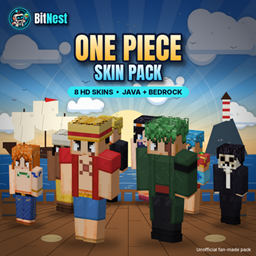
Putting together a crew for a new world, or want to change your usual look before heading to a server? This pack adds eight One Piece-inspired skins: choose Captain Luffy, swordsman Zoro, navigator Nami, or one of the other crew members.
Eight looks for the crew 🏴☠️
Luffy has a straw hat with a red band, an open red jacket, a scar under his left eye, and an X-shaped scar on his chest. Zoro is easy to recognize by his short green hair, the scar over his closed eye, three gold earrings, and dark green coat with a reddish sash. Nami has long orange hair, a green-and-white top, a tattoo on her left shoulder, and blue jeans.
Usopp wears a white wide-brimmed hat, goggles around his neck, red suspenders, and rolled-up yellow trousers. Sanji wears a black suit with gold buttons, a yellow shirt, and a brown tie; his blond hair covers his right eye. Robin wears a dark blue vest, a lavender backpack, a long sarong skirt with seaweed and flowers, and white sunglasses with orange lenses on her forehead.
Franky stands out with a blue pompadour, a red Hawaiian shirt with palm trees, and huge light blue robotic forearms. Brook is a skeleton with a huge black afro, wearing a tailcoat, a white ruffled shirt, black trousers, and tall boots. Pick a character to match your mood or bring a themed crew together in your world.
HD details and file selection 🎮
The HD skins have a resolution of 128×128 and an outer layer with voluminous hair, collars, jackets, accessories, and shoes. Details include expressive eyes, strands of hair, seams, and clothing outlines. The texture is detailed on every side: front, back, sides, top, and bottom. Each character uses either the Classic or Slim model.
For Bedrock, you can choose the HD file One_Piece_Characters_Skin_Pack_Bedrock_HD_v1.1.0.mcpack or the standard 64×64 version One_Piece_Characters_Skin_Pack_64x_Java-Bedrock_v1.1.0.mcpack. This pack is for skins only: no add-on or experimental toggles are needed. It is compatible with Bedrock 1.18.30 and newer on Windows, Android, iOS, and Chromebook, and the skins can be used in worlds and on servers.
How to choose a skin in Bedrock
- Download the HD file or the 64×64 version.
- Open the file on Windows, Android, or iOS—Minecraft will launch and automatically import the pack.
- In the game, open “Dressing Room” → “Classic Skins.” In older versions, the path may be: “Profile” → “Edit Character” → “Classic Skins.”
- Select One Piece Characters and equip the look you like.
Version for Java Edition
For standard Java Edition, use only the 64×64 file: the standard Java version accepts skins at this resolution.
- Download
One_Piece_Characters_Skin_Pack_64x_Java-Bedrock_v1.1.0.mcpack. - Rename the file extension from
.mcpackto.zipand extract the archive. - Inside, find the PNG file for the character you want. The filenames look like
character_CLASSIC.pngorcharacter_SLIM.png. - In Minecraft Launcher, open Java Edition → Skins → New skin → Browse and select the PNG. Choose Classic or Slim to match the filename, then click Save & Use.